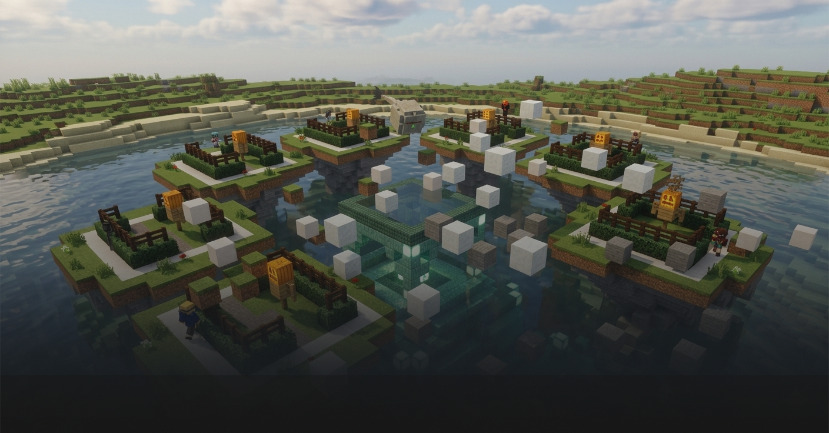
Speed Builders
Memorize builds, copy fast, survive rounds, be the last champ.
Description
Memorize the build, replicate it as fast as possible, and survive each round. The player with the lowest accuracy is eliminated until one champion remains.
Game type notes
This is a Minigame: it is designed for standalone arenas, but it can also be used inside party rotations. Minigames usually provide longer, feature-rich rounds.
What you get with BlueArcade 3 + this module
- Party system (lobbies, queues, and shared party flow).
- Store-ready menu integration and vote menus.
- Victory effects and end-game celebrations.
- Scoreboards, timers, and game lifecycle management.
- Player stats tracking and placeholders.
- XP system, leaderboards, and achievements.
- Arena management tools and setup commands.
Features
- 350+ ready-to-play structures included, from everyday objects to fantasy scenes, so every match feels fresh.
- Memory-and-speed gameplay that rewards spatial awareness, fast building, and staying cool under pressure.
- Shuffled structure rotation with no repeats until the deck is exhausted.
- Precision judging that handles complex blocks, fluids, signs, and mobs fairly.
- Perfect build moments with instant broadcasts and early round endings when everyone nails it.
- Round-based elimination where the lowest score is eliminated each round, building tension until one champion remains.
- Cinematic Elder Guardian spectacle that watches the showcase and eliminates players with a laser beam and dramatic plot explosion.
- Custom structures to expand the game with your own builds.
- Full BlueArcade 3 integration with stats, leaderboards, achievements, XP, parties, and store-ready menus.
Arena setup
Common steps
Use these steps to register the arena and attach the module:
/baa create [id] <standalone|party>— Create a new arena in standalone or party mode./baa arena [id] setname [name]— Give the arena a friendly display name./baa arena [id] setlobby— Set the lobby spawn for the arena./baa arena [id] minplayers [amount]— Define the minimum players required to start./baa arena [id] maxplayers [amount]— Define the maximum players allowed./baa game [arena_id] add [minigame]— Attach this minigame module to the arena./baa stick— Get the setup tool to select regions./baa game [arena_id] [minigame] bounds set— Save the game bounds for this arena./baa game [arena_id] [minigame] spawn add/baa game [arena_id] speed_builders plot addto configure plot-based spawns./baa game [arena_id] [minigame] time [minutes]— Set the showcase + build duration.
Module-specific steps
Speed Builders requires one plot per player, a separate build area per player, and one showcase plot (central reference plot).
1. Configure plots
Each plot is a cuboid region defined with the setup stick. The plot is the full island/player bounds, not the exact building surface.
/baa game [arena_id] speed_builders plot add— Save a plot/island region using the stick selection (select 2 corners first). Your current location is saved as the plot spawn./baa game [arena_id] speed_builders plot set [plot_id]— Redefine an existing plot's region and spawn using the current stick selection and your location./baa game [arena_id] speed_builders plot remove [plot_id]— Remove a plot. Remaining plots are re-indexed automatically./baa game [arena_id] speed_builders plot spawn set [plot_id]— Update the spawn point of an existing plot to your current location.
Run /baa game [arena_id] speed_builders plot add once per player island/slot. The first plot is index 1, the second is index 2, etc.
2. Configure each plot's build area
Build areas define where players can actually place and break blocks. Configure them from the plot command so the plot ID is always explicit. Each build area must be fully inside its plot. The center of the build area's lowest layer is used as the structure origin for reference placement, cleanup, and scoring.
The floor material is detected automatically from the lowest block layer of the build area selection.
Build area requirements and recommendation:
-
Minimum allowed size is 2 blocks high (1 floor layer + 1 build layer), so custom structure packs can use smaller build areas.
-
Recommended size for the default bundled structures is 7×10×7 blocks (
X×Y×Z). This covers almost all defaults while avoiding oversized outliers. -
If a build area is smaller than 7×10×7, the setup command saves it but warns you. At runtime, oversized structures are skipped; this is useful if you provide your own smaller structures.
-
The floor must be 1-2 block layers thick. If more than 2 lower layers contain blocks, the selection is rejected.
-
/baa game [arena_id] speed_builders plot build_area set [plot_id]— Save or redefine the build area for that exact plot. -
/baa game [arena_id] speed_builders plot build_area remove [plot_id]— Remove the build area assigned to that plot.
Example workflow:
/baa stick— Get the selection tool.- Select corner 1 and corner 2 of the first plot/island.
/baa game 1 speed_builders plot add— Save plot 1. Your current location is set as the plot spawn.- Select corner 1 and corner 2 of the first build area (must be inside the plot and include the floor plus build height).
/baa game 1 speed_builders plot build_area set 1— Save the build area for plot 1.- Repeat for each additional player slot, using the matching plot ID.
- (Optional)
/baa game 1 speed_builders plot spawn set 1— Adjust the spawn of plot 1 if needed.
3. Configure the showcase reference
The showcase is the central reference build shown after build time ends, during judging, so players can compare their build with the correct answer. It is not kept visible while players are building. Select the showcase region with the setup stick, stand where the reference origin should be, then run:
/baa game [arena_id] speed_builders showcase set— Save or redefine the central showcase reference plot./baa game [arena_id] speed_builders showcase remove— Remove the showcase reference plot.
4. Add structures
/baa game [arena_id] speed_builders structure create <id>— Save the current stick selection as a structure./baa game [arena_id] speed_builders structure remove <id>— Delete a structure./baa game [arena_id] speed_builders structure list— List all loaded structures.
Technical details
- Minigame ID:
speed_builders - Module Type:
MINIGAME
Links & Support
- Website: https://www.blueva.net
- Documentation: https://docs.blueva.net/books/blue-arcade
- Support: https://discord.com/invite/CRFJ32NdcK